


XT Portal 7.0 Gets Updates
Discover what’s new in XT Portal 7.0: ACPR filing profile import, validation in the browser, Pillar 2 and more
XT Portal 7.0 is a major release of UBPartner’s platform for managing and producing regulatory reporting, and a recommended upgrade for all customers and partners.
This version brings a fully redesigned interface, automatic import of the ACPR “carte de visite” (filing profile), validation results viewable directly in the browser, support for Pillar 2 collections, and a thorough technical and security upgrade. Below is a summary of the main new features.
PRODUCT RELEASE NOTICE
A new version of the XT Portal (version 7.0) is available, and the XT Cloud Service has already been updated.
Version 7.0 is a general release of XT Portal and replaces all previous versions. It adds a number of new features, product fixes and performance improvements. It is therefore a recommended upgrade for all implementations.
XT Portal 7.0 at a glance
| Area | Status | What it brings |
|---|---|---|
| ACPR filing profile import | New | Submissions, expected tables and deadlines created automatically from the “carte de visite” |
| Validation results in the browser | New | Errors highlighted on the table, with the rule and the cells involved |
| Pillar 2 collections | New | XML collections for the OECD global minimum tax (GloBE) |
| Interface | Redesigned | New look, one-click language switch, customisable columns and filters |
| Checks and processing | Improved | More robust xBRL-CSV, new DORA controls, 2025 ESEF filing rules |
| Security and technology | Upgraded | Modernised stack, HashiCorp Vault, secured API documentation |
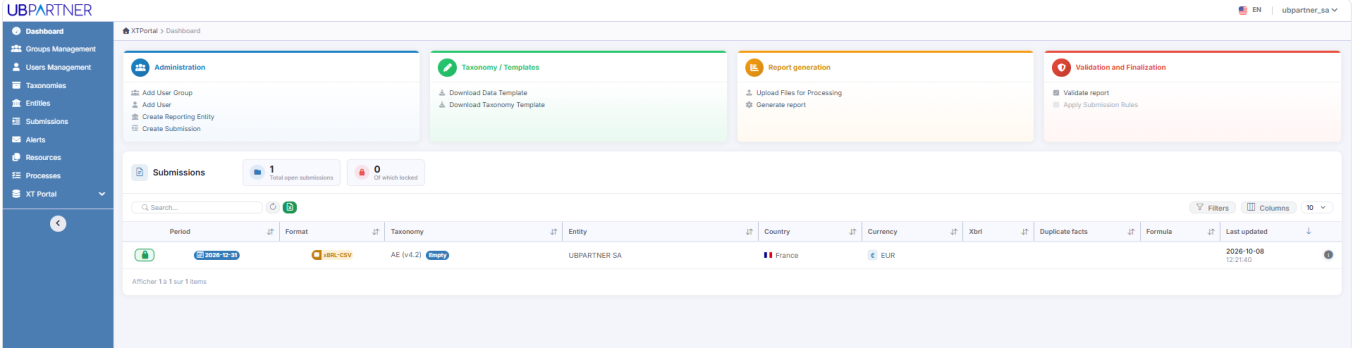
The redesigned XT Portal 7.0 dashboard, with quick links, filters and column selection.
A redesigned interface that keeps your bearings
XT Portal has a brighter, more contemporary look and a smoother user experience. Users still find their familiar navigation: the dashboard, quick links and login announcements are all still there.
- Multilingual by design: flags let users switch between French and English in one click, without a browser extension. More languages can be added.
- Customisable lists: in every list, users choose which columns to display and combine several filters (format, period, entity and so on) to find the right submission quickly. Taxonomies can now also be filtered by date.
- Clearer taxonomy organisation: labels and modules have been standardised across frameworks and versions, which makes it easier to find, for example, the COREP version that applies on a given date.
- Visual cues: a dedicated label shows submissions that are still empty, so users know at a glance where work remains.
- Richer announcements: messages shown at login can be formatted and come with attachments, such as release notes.
New: import of the ACPR filing profile
This is one of the main new features for French customers. The user imports the filing profile (“carte de visite”) downloaded from the ACPR’s OneGate portal, and XT Portal does the rest:
- Submissions created automatically, both XBRL reports and document-based collections (“remises bureautiques”), with their reporting requirements and filing deadlines. Users see their due dates at once and know what to work on first.
- Expected tables managed automatically: where the regulator specifies it (mainly in banking filing profiles, for example COREP or AML/CFT), each table is marked as mandatory, optional or not expected. No more updating dozens of tables by hand for every reporting date, and validation takes into account only the tables actually expected.
- Controlled updates: when a new filing profile is imported, XT Portal detects differences with existing submissions and offers to update them.
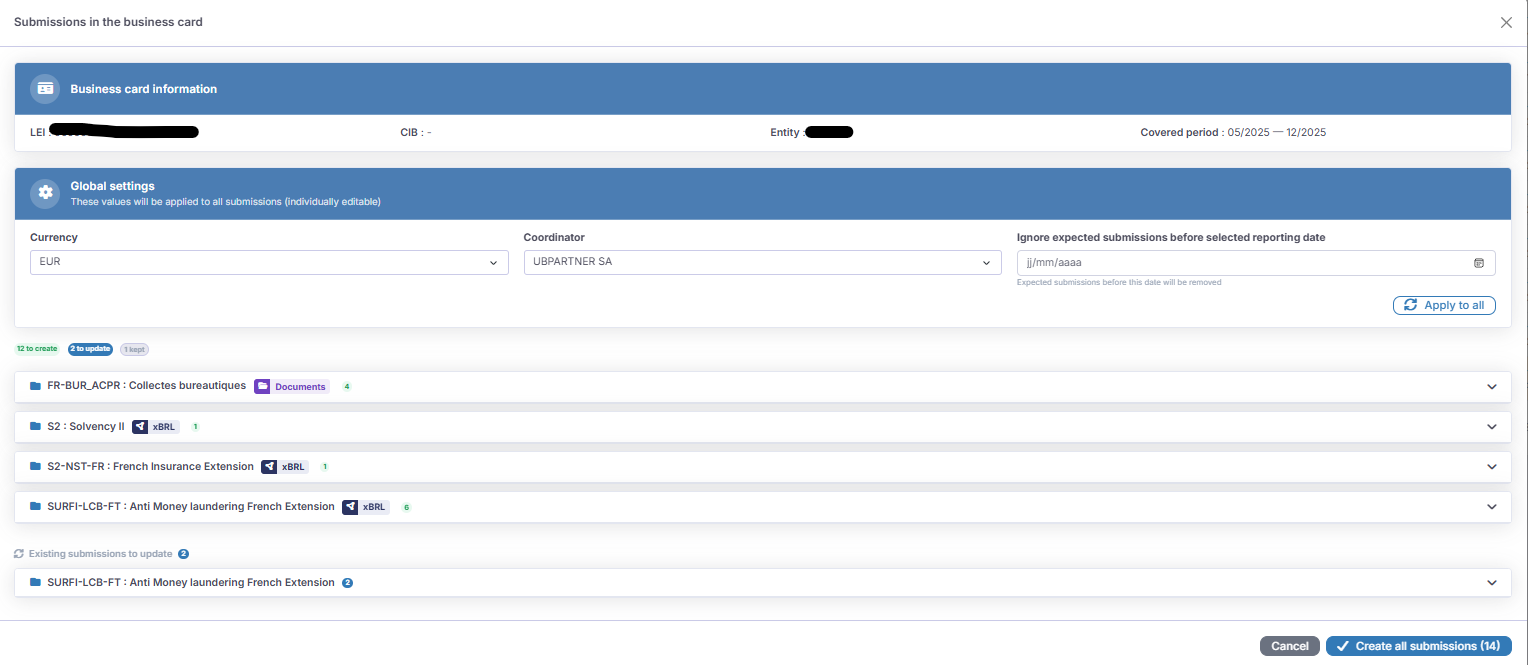
Importing a filing profile: XT Portal lists every submission to create or update, XBRL reports and document-based collections alike.
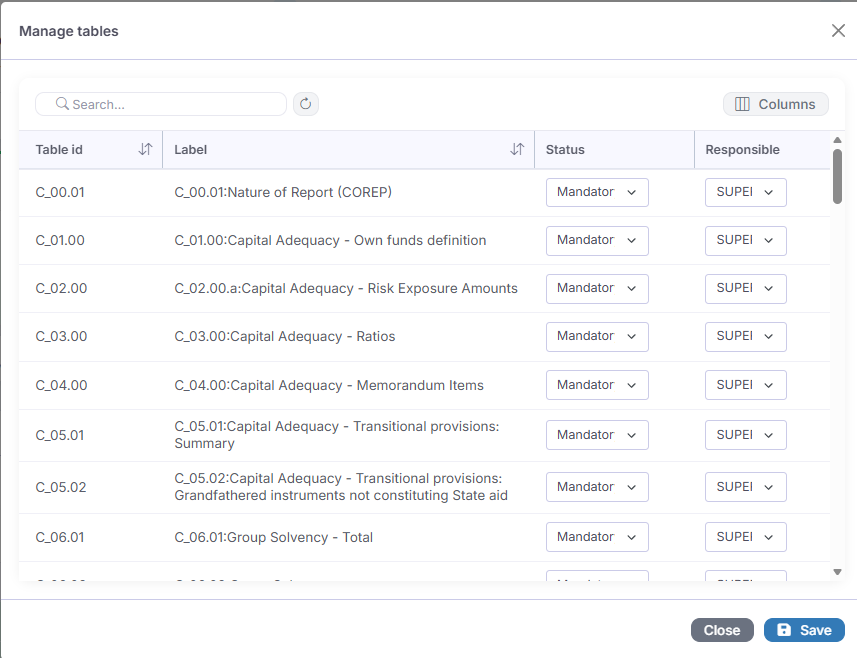
Each table of a submission is marked as mandatory, optional or not expected.
For document-based collections, each expected document now has its own place: it can be uploaded, downloaded and tracked individually, giving users one central space and a complete audit trail of what they submitted to the regulator.
XT Portal also handles the Base64-encoded files used by OneGate: it can display them and produce the decoded XBRL file the portal expects. A submission can be created directly from such a processing.
New: validation results directly in the browser
After a processing run, there is no longer any need to download Excel files to analyse errors. XT Portal shows each reported table in the browser, laid out like the Excel file, with validation errors highlighted on the cells. This view is available for both XBRL and xBRL-CSV submissions, and the Excel file can still be downloaded if needed.
Above all, the platform shows the validation rule behind each error and the cells it involves. By clicking an error, users immediately see which data points are at stake, something an annotated Excel file cannot do. They correct their input data, rerun the process, and the view updates: a faster, clearer correction cycle.
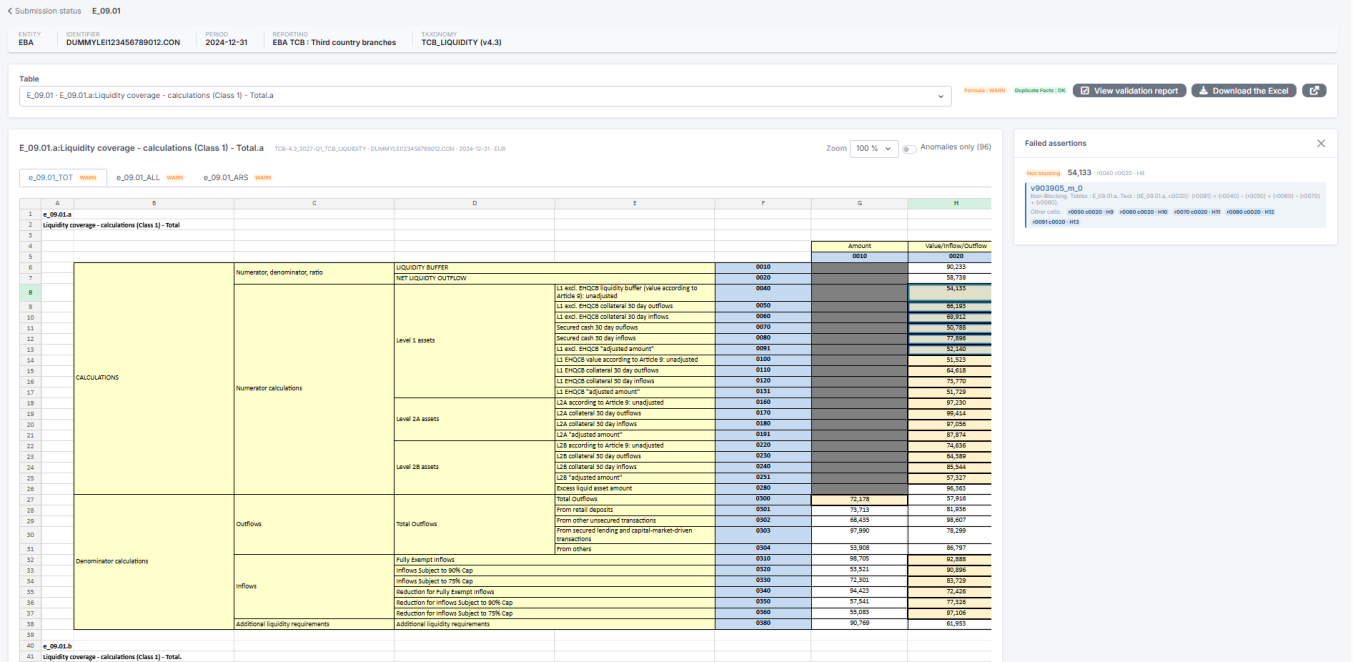
A reported table viewed in the browser, with the failed validation rule and its cells shown on the right.
Find out more
XT Portal Collection System
XT Cloud Service
New: Pillar 2 collections
XT Portal 7.0 supports the XML collections for Pillar 2 (OECD global minimum tax, GloBE), including the choice between the regulator’s test and production environments when submitting.
More robust processing and more complete checks
The processing engine at the heart of XT Portal has been updated, with several concrete benefits for reporting teams:
- More reliable xBRL-CSV: more robust processing of the EBA’s new format, and potential inconsistencies in Excel mappings are now flagged visually.
- Stronger DORA checks: new ECB controls on LEI data, including a check that each declared LEI matches its country, and clearer reporting of reference errors between tables.
- Up-to-date rules: support for the 2025 ESEF filing rules.
Easier administration
Administrators get new tools to run the platform day to day: a dedicated view of processing logs and validation results, a redesigned event monitoring feature, notes attached to each framework update, direct assignment of LDAP users to application groups, and a clear display of the licence expiry date, with a reminder shown ahead of renewal.

Security and Technology Upgrades
XT Portal 7.0 also brings its technical foundations up to date:
- a modernised technology stack (latest Tomcat and Spring Boot versions, a new front end, support for current Java LTS versions);
- secure storage of sensitive settings, such as passwords, in HashiCorp Vault;
- stronger security for Excel uploads and shorter-lived access tokens;
- new, secured API documentation (Swagger) for teams that integrate XT Portal with their own systems.
Availability and Downloads
XT Portal 7.0 is already live for our SaaS customers, and the XT Cloud Service now runs on version 7 of our XBRL toolkit (SDK).
On-premise customers can upgrade by following the procedure in the installation guide. The release notes, the installation guide and the user guide are available from the customer download page.
To install the software, customers and partners must have a software key and a current maintenance and support agreement with UBPartner. This can be obtained from your reseller or from UBPartner at customer@ubpartner.com.
Please contact support@ubpartner.com or your sales representative/reseller if you require additional information on this release, or any help with installation and the upgrade.
Previous Releases
The previous general release will continue to be supported for a minimum period of 12 months following this release.
Customers wishing to continue using earlier versions can continue with Extended Support after this time. Please contact support@ubpartner.com if you want further details on this.
